


Wake a 0V LiFePO4 Pack in 10 Minutes: Safe BMS Reset for Technicians
If your LiFePO4 pack reads 0V, the fix is usually a LiFePO4 aware charger with a 0V wake or contactor reset function, run at a low current until the battery management system re-closes its output. Do not attempt this if the case is swollen, leaking, or smells off. If the pack still won’t wake after a proper LiFePO4 charging attempt, stop and call a professional or your battery supplier before trying anything more aggressive.
TL;DR:
- Most LiFePO4 packs can be recovered using a charger with a 0V wake or contactor reset function, but only if the pack shows no signs of damage or swelling.
- Safety checks including visual inspection, voltage measurement, and temperature reading are essential before attempting a reset to avoid dangerous conditions.
- Resetting typically involves low-current pulses or specialized chargers that send detection currents, and should be followed by a full charge cycle to verify proper cell voltage balance.
- Persistent faults with cell voltages below 1.5V, heating, or repeated cycle cutouts indicate a failing pack that requires professional diagnosis and possibly replacement.
- Firmware updates on smart BMS units can influence reset behavior; always resolve existing faults and stabilize the pack before updating firmware.
Table of Contents
- What Triggers LiFePO4 BMS Protection and a 0V Reading?
- What Safety Checks Should You Run Before Attempting a Reset?
- How Do You Reset a LiFePO4 BMS Step by Step?
- What If the BMS Fault Won’t Clear?
- How Do You Prevent Future BMS Lockouts?
- Does Resetting a BMS Repeatedly Damage the Battery?
- Do Reset Steps Differ Across LiFePO4 BMS Brands?
- Can Firmware Updates Affect a BMS Reset?
- When Is It Time to Stop and Call a Professional?
- Get a Compatible LiFePO4 Charger or Replacement Pack
- Sources
- FAQ
What Triggers LiFePO4 BMS Protection and a 0V Reading?
A lithium battery management system exists to keep cells inside a safe operating window. It tracks voltage, current, and temperature on every cell, and it cuts power the moment one of those numbers crosses a threshold. That protection is what saves your pack from a punctured cell or a fire, but it’s also what makes a perfectly good battery look dead.
When the BMS trips, it opens a MOSFET or contactor and disconnects the terminals entirely. A multimeter at the terminals reads 0V even though the cells inside might still hold 2.8V or more each. Standard chargers are built to detect a baseline voltage before they’ll deliver current, so a BMS cutout can present 0V at the terminals while cells still contain charge, and an ordinary charger simply refuses to talk to it.
A few numbers help explain why this matters:
- Healthy LiFePO4 cells typically sit between 2.5V and 3.65V depending on state of charge.
- A 12V pack (4 cells) commonly ranges from roughly 10V to 14.6V across its full cycle.
- Once a cell drops toward 2.0V or lower, most BMS units cut the circuit rather than risk permanent damage.
That gap between “cells still have charge” and “terminals read nothing” is exactly where a targeted reset procedure comes in.
What Safety Checks Should You Run Before Attempting a Reset?
Skipping diagnostics is how a bad battery day turns into a dangerous one. Work through these checks in order, and stop immediately if anything looks wrong.
- Look at the case. Swelling, cracks, leaking electrolyte, or a burnt smell mean stop, full stop. The NFPA warns that improper handling of lithium batteries increases fire risk, and a damaged cell is not a candidate for any home recovery attempt.
- Measure terminal voltage. Use a multimeter to confirm whether you’re at true 0V or just a low reading that a Li-specific charger can still recognize.
- Check individual cell voltages if the battery gives you access. A pack with one cell far below the others points to imbalance or a failing cell, not a simple lockout.
- Inspect cables and connections. A loose ring terminal or corroded connector can mimic a BMS fault entirely.
- Check the temperature. A pack pulled from a freezing garage or baked in a hot trunk needs to reach a moderate room temperature before you try anything. LiFePO4 chemistry doesn’t charge safely near freezing.
A decent multimeter is affordable, and a LiFePO4-aware charger with wake capability is moderately priced. Running through this checklist takes about 10 to 15 minutes, well worth it before you commit to a longer recovery attempt.
Pro Tip: Keep a written log of voltage readings from each check. If the pack fails again in a few weeks, that log tells you (or a technician) whether the problem is progressing or was a one-time event.
How Do You Reset a LiFePO4 BMS Step by Step?
Once the safety checks are clear, work through these methods in order. Start with the safest, most controlled option and only move down the list if it doesn’t work.
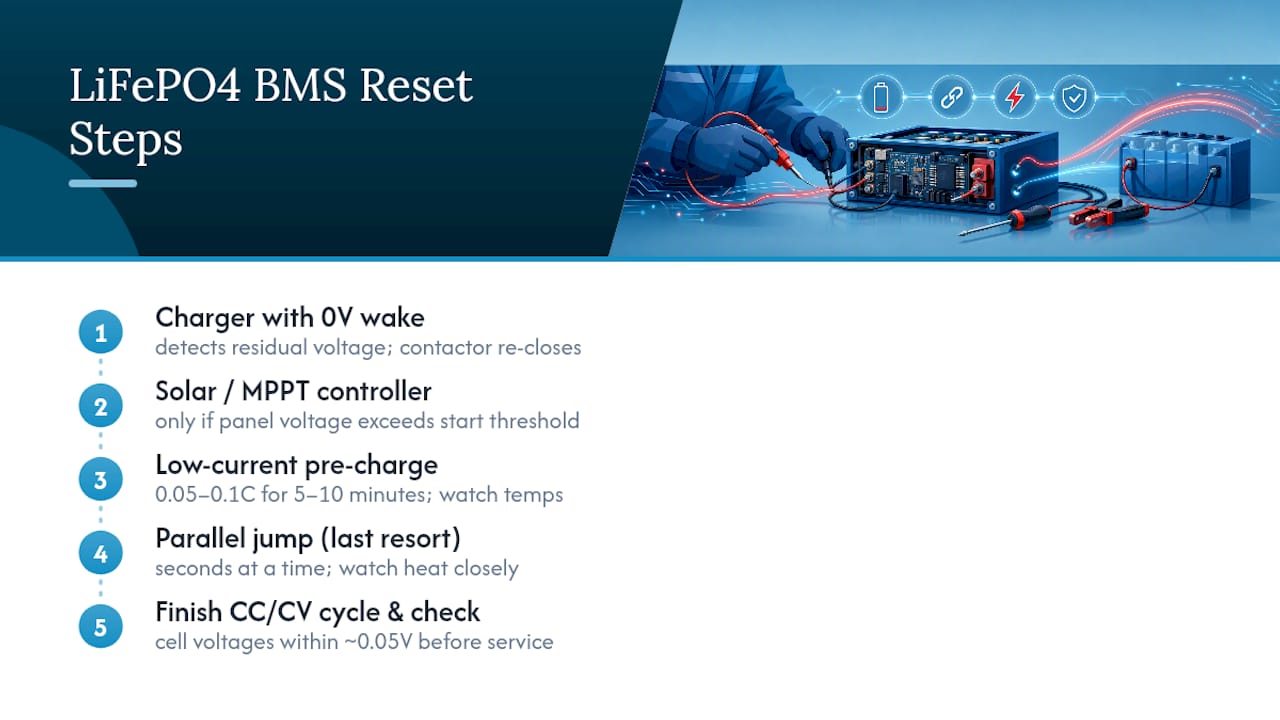
Method A: LiFePO4-specific charger with 0V wake or contactor reset. This is the method most technicians reach for first. These chargers send a small detection current to the terminals and, if they sense any residual voltage inside the pack, trigger the contactor to re-close. Practical workshop reports note that chargers built with contactor-reset functions recover packs that standard chargers can’t touch, which avoids a lot of unnecessary battery replacements. Expect the wake sequence to take a few minutes before the charger transitions into normal charging. A rising voltage on the display within the first 5 to 10 minutes is your sign it worked.
Method B: Solar or MPPT charge controller. If you’re off-grid or on a boat, an MPPT controller can sometimes coax a sleeping BMS awake, but only if your panel’s open-circuit voltage clears the controller’s start threshold. Check that spec before you rely on this route, since solar wake-up only works when PV voltage exceeds the controller’s minimum start voltage.
Method C: Low-current pre-charge. With a regulated power supply, apply a gentle current between 0.05C and 0.1C (for a 100Ah battery, that’s 5 to 10 amps) for 5 to 10 minutes. Watch the case temperature and cell voltages as you go. Many practical guides recommend this exact range for coaxing a sleeping BMS back online. Once voltage stabilizes and climbs steadily, switch over to normal constant current, constant voltage (CC/CV) charging.
Method D: Parallel jump from a healthy battery. Treat this as a last resort, not a first move. Connect a healthy LiFePO4 battery of similar voltage in parallel for only a few seconds at a time, watching for excessive heat, and move to a proper charger the moment you see any voltage response. Guides consistently frame this as an emergency-only technique, since parallel jump-starting carries meaningfully higher risk than a charger with contactor-reset behavior.
After any of these methods succeeds, let the battery finish a full CC/CV cycle and check that cell voltages land within about 0.05V of each other before you put it back into service.
What If the BMS Fault Won’t Clear?
Some faults aren’t a sleep state at all. They’re a sign the pack itself is failing, and no amount of wake pulses will fix that.
Watch for these red flags:
- One or more cells reading below 1.5V even after a wake attempt.
- The BMS re-engages briefly, then cuts out again within seconds or minutes.
- The pack gets noticeably warm during a low-current pre-charge with no load applied.
- Cell voltages that refuse to converge no matter how long you charge.
A cell held below roughly 1.5V for an extended stretch can develop internal damage that makes recharging genuinely unsafe, not just ineffective. At that point, cell-level balancing by a technician with proper equipment is the only responsible next step, and it’s worth contacting your supplier about warranty coverage before you spend money on repair parts. If the pack is confirmed dead, dispose of it through a certified lithium battery recycling program rather than regular trash. Continuing to force-charge a pack that shows these signs risks the exact fire hazard the NFPA warns about, not just a wasted afternoon.
How Do You Prevent Future BMS Lockouts?
Most lockouts trace back to charging habits, not bad luck. A few adjustments cut the risk dramatically.
- Charge within the voltage window your battery’s documentation specifies. LiFePO4 charge profiles use lower per-cell voltages than many other lithium chemistries, and using a charger tuned for a different chemistry is a common cause of premature cutoffs.
- Store batteries around 50% state of charge rather than fully charged or fully drained, and check voltage every 3 to 6 months during storage.
- Always use a charger and controller rated for LiFePO4 specifically, not a generic lead-acid or lithium-ion unit. Our LiFePO4 charger compatibility guide walks through what to look for.
- Keep a simple log after heavy use trips or long storage stretches so a slow decline doesn’t sneak up on you.
Pro Tip: *Set a phone reminder for storage check-ins.
Does Resetting a BMS Repeatedly Damage the Battery?
An occasional wake-up cycle isn’t harmful. LiFePO4 chemistry is genuinely tough, and a BMS reset that returns the pack to normal CC/CV charging doesn’t put unusual stress on the cells the way, say, a deep over-discharge does. The reset itself is just closing a switch that was protecting the pack. It’s not a jolt to the chemistry.
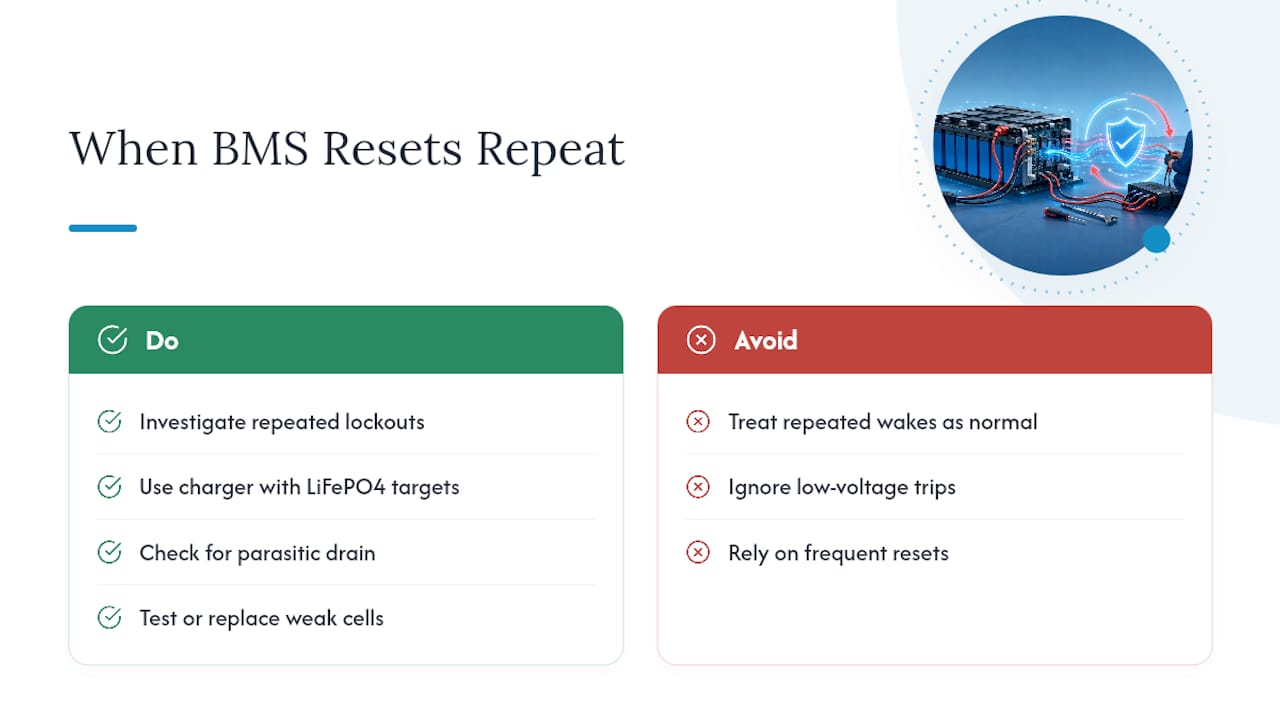
Frequent resets are a different story, not because the reset process wears out the battery, but because whatever is causing repeated lockouts almost certainly is. If you find yourself waking the same pack every few weeks, that’s a pattern worth investigating rather than a routine to accept. Common culprits include a charger set for the wrong voltage profile, a parasitic drain pulling the pack down between uses, or one weak cell dragging the whole pack into protection mode faster than the others.
Each trip into deep discharge territory, the kind that actually triggers the BMS, does chip away at usable capacity over time, even in a chemistry rated for thousands of cycles. A pack that’s tripped its low-voltage cutoff a dozen times in its first year is not aging the same way as one that’s been kept in a healthy voltage band the whole time. Repeated resets are a symptom you should chase down, and often the fix is as simple as swapping to a charger with accurate LiFePO4 voltage targets or checking for a phantom load like a dash clock or alarm system that never fully shuts off.
Do Reset Steps Differ Across LiFePO4 BMS Brands?
The core idea, wake the BMS, then resume normal charging, stays the same across brands. What changes is how each system signals its state and how it wants to be woken.
Some BMS units include a physical reset button or a small LED that blinks in a specific pattern to indicate a protection trip versus a full fault. Others communicate only through Bluetooth or an app, showing a fault code you’d never see with just a multimeter. Smart BMS units with Bluetooth monitoring often give you cell-by-cell voltage data before you even touch a charger, which cuts your diagnostic time considerably compared to a basic BMS with no display at all.
Contactor-based systems, common in higher-capacity marine and RV packs, physically disconnect with an audible click and generally need a charger that specifically advertises a contactor-reset function to bring them back. MOSFET-based systems, more common in smaller powersports batteries, tend to respond well to a straightforward low-current wake pulse without needing specialized hardware.
The practical takeaway: check your battery’s documentation or manufacturer app before assuming a generic wake procedure will work. A pack with Bluetooth diagnostics will often tell you exactly which protection triggered, saving you from guessing your way through Methods A through D. If your documentation is missing entirely, our LiFePO4 battery voltage chart at least gives you a baseline for what normal cell and pack voltages should look like for your configuration.
Can Firmware Updates Affect a BMS Reset?
Increasingly, yes. Smart BMS units with app connectivity or Bluetooth monitoring often run firmware that governs exactly when protection triggers and how the wake sequence behaves. An outdated firmware version can cause a BMS to trip more conservatively than necessary, or fail to recognize a legitimate wake signal from a compatible charger.
If your battery’s manufacturer offers a companion app, check for firmware updates before you assume the hardware itself has failed. Some manufacturers push updates specifically to correct false-trip thresholds or improve compatibility with third-party chargers, issues that look identical to a hardware fault from the outside. This is more relevant for higher-end packs with connected BMS units than for basic powersports batteries, which typically run fixed firmware that isn’t user-updatable at all.
One caution here: never attempt a firmware update on a pack that’s currently in a fault state or reading 0V. Get the battery back to normal operation first, confirm it holds a stable charge, and only then check for and apply any pending firmware updates. Updating firmware mid-fault can leave the BMS in an unpredictable state that’s harder to diagnose than the original problem. If your app shows a firmware update available and your battery is currently misbehaving, resolve the reset first, verify normal charging for a few cycles, then update.
When Is It Time to Stop and Call a Professional?
I’d keep going with a DIY reset as long as the case looks intact, cell voltages sit above 1.5V, and the pack isn’t heating up on its own. Cross any of those lines and I stop immediately. Swelling or heat without a load applied means something inside has already failed, and no wake procedure fixes that safely.
I lean toward Li-specific chargers with a documented contactor-reset function over generic wake tricks, mainly because they’re built to detect the actual fault state rather than guess at it. Shops that insist on pulling cell-level data before touching a pack aren’t being overcautious. They’re catching the packs that look salvageable but aren’t. Banshee Batteries backs its LiFePO4 packs and compatible chargers with warranty support, which matters most exactly when a reset attempt doesn’t go as planned.
— Donald
Get a Compatible LiFePO4 Charger or Replacement Pack
A gentle wake pulse only works if the charger behind it actually understands LiFePO4 voltage curves, and a lot of the “dead battery” calls we hear start with a charger that was never built for lithium in the first place. Some lithium packs and charging accessories are designed specifically around LiFePO4 charge profiles, so the wake and charge sequence matches what the chemistry actually needs instead of forcing a lead-acid curve onto it.
If your diagnostics turned up a cell that won’t recover, or if repeated lockouts have you thinking about replacement rather than repair, our lithium marine batteries and powersport lithium batteries come backed by a 5-year warranty on marine lithium packs. For readers still troubleshooting a pack worth saving, browse our LiFePO4 charger options built with proper voltage accuracy for this chemistry, or check our deep-cycle 100Ah LiFePO4 battery if replacement makes more sense than another recovery attempt. Reach out to our support team if you’re unsure which option fits your setup.
Sources
Technical claims in this guide draw on the NFPA’s lithium-ion battery safety guidance, Texas Instruments’ application note on multi-chemistry charging, and practical workshop documentation on contactor-reset charging behavior. These cover the fire-safety, voltage-accuracy, and hardware-behavior claims made throughout this guide.
- Why Lithium Batteries Won’t Charge After a BMS Cutout - Traction Chargers
- TI application note: Multi-chemistry charging designs (LiFePO4 specifics)
- NFPA — Lithium-ion batteries (home fire safety)
FAQ
What Are the Recommended BMS Settings for a LiFePO4 Battery?
Charge voltage windows follow manufacturer-specific LiFePO4 profiles, and commonly top out around 14.6V for a 12V pack, with low-voltage cutoff often near 10V depending on the specific battery and BMS design. Always check your battery’s own documentation rather than assuming a generic figure applies.
Can I Do a BMS Reset Myself?
In most cases, yes, if the pack shows no physical damage and cell voltages sit above roughly 1.5V. A LiFePO4-aware charger with a wake or contactor-reset function handles the majority of lockouts safely without special tools.
What Happens if the BMS Is Not Reset?
The pack stays disconnected indefinitely, delivering zero output even though the cells may still hold usable charge. Left untouched long enough, a locked-out pack can drift into deeper discharge territory that eventually causes permanent cell damage.
How Do You Bring a LiFePO4 Battery Back to Life?
Run safety checks first, then apply a low-current wake pulse (roughly 0.05C to 0.1C) using a LiFePO4-specific charger until voltage rises and stabilizes. Once the BMS re-engages, switch to normal CC/CV charging and confirm the cells balance within about 0.05V of each other.