


Battery Registration After Replacement: A DIY Guide
If your car has a Battery Management System (BMS), yes, you need to register the new battery. Skip it, and the BMS keeps using the old battery’s learned charging profile, which can undercharge or overcharge your brand-new battery from day one. The fix is a quick process with the right tool.
Your next step right now:
- Check your owner’s manual for “battery registration,” “battery adaptation,” or “IBS sensor” mentions.
- Look up your VIN on your OEM’s service portal or a compatibility checker to confirm BMS presence.
- If your vehicle is a BMW, VW, Audi, Mercedes, or a GM model with start-stop, assume registration is required until confirmed otherwise.
What to have on hand before you start:
- OBD-II dongle (OBDeleven, Carista, or a Midtronics-compatible tool)
- Smartphone with the corresponding app installed and updated
- New battery’s Ah rating, chemistry type (AGM, EFB, or flooded), manufacturer code, and serial number (usually on the battery label)
Pro Tip: Can’t find the manufacturer code or serial number? Enter the new battery’s correct Ah capacity and change only the last digit of the previous battery’s serial number. The BMS will recalibrate without needing a validated OEM code. More on this in the step-by-step section below.
Table of Contents
- Why skipping registration can kill a new battery fast
- Which vehicles require battery registration?
- How to register a battery: three methods, step by step
- Which tools actually perform battery registration?
- Troubleshooting warning lights and errors after registration
- Safety steps and pre-install checks before you touch the battery
- Key Takeaways
- The part most DIYers get wrong
- Bansheebatteries has the battery and the guidance to match
- Useful sources and further reading
Why skipping registration can kill a new battery fast
The BMS adapts the alternator’s charging voltage and current based on what it believes the battery’s condition to be. An aging battery needs a different charge curve than a fresh one. Install a new battery without registering it, and the vehicle continues applying the old, degraded charging strategy.
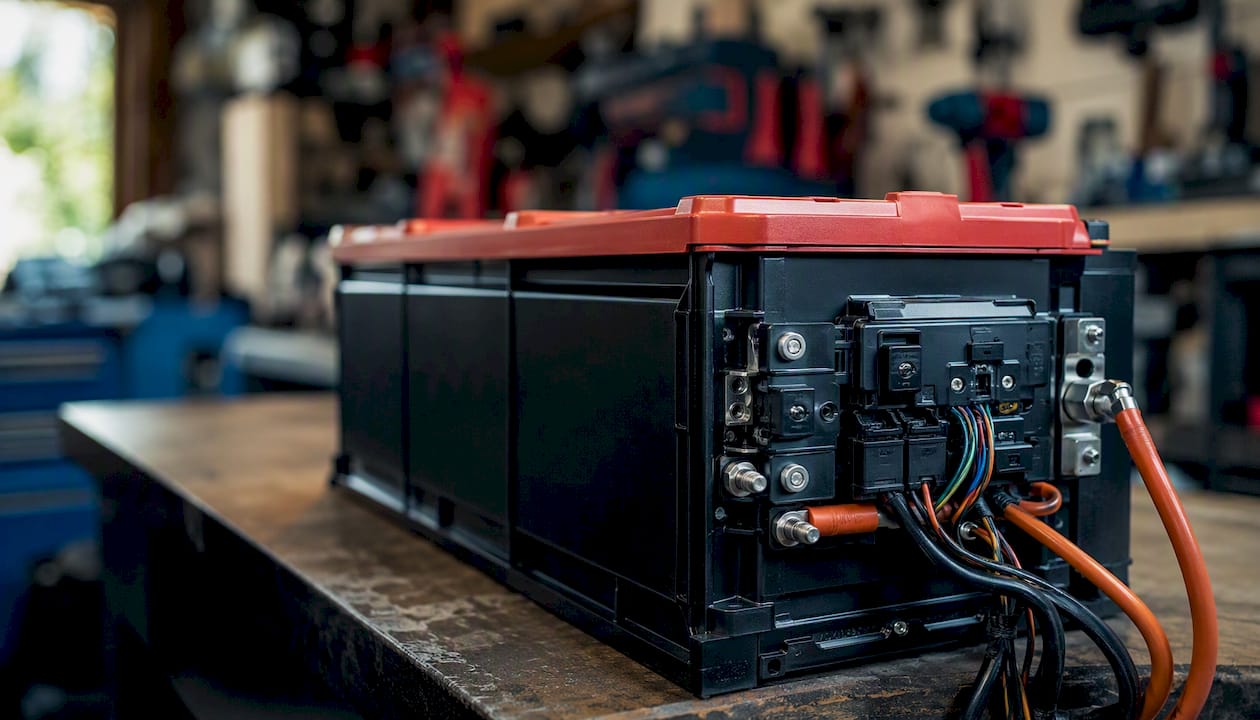
Mechanics who specialize in European vehicles report this as one of the most common causes of customer comebacks: a new, healthy battery failing within months because the vehicle never stopped treating it like a worn-out unit. According to experienced technicians, skipped registration is a leading cause of premature battery failure on BMS-equipped cars.
Concrete consequences of skipping registration include:
- Chronic undercharging, leaving the battery in a partial state of charge that accelerates sulfation
- Overcharging on vehicles where the BMS compensates aggressively, which degrades AGM cells faster than normal cycling
- Dashboard warning lights (battery, charging system, or start-stop unavailable)
- Erratic electrical behavior: flickering lights, infotainment resets, or unstable idle
- Potential warranty complications if a dealer inspection reveals the BMS was never updated after the swap
Midtronics, whose battery service tools are used by dealerships across the country, describes registration as proactive maintenance that protects the investment in a high-performance battery by ensuring correct charging from day one. That framing is accurate. Improper charging can significantly degrade even premium AGM batteries, resulting in wasted money.
Which vehicles require battery registration?
Not every car needs it. Older vehicles without a BMS, start-stop system, or Intelligent Battery Sensor (IBS) are generally plug-and-play. The complication starts with vehicles that actively manage charging based on battery condition.
Makes and models that commonly require registration:
- BMW: Nearly all models from the mid-2000s onward, including the 3, 5, 7 Series, X3, X5, and Mini Cooper variants. BMW’s IBS sensor and EfficientDynamics charging management make registration mandatory.
- Volkswagen / Audi: Most MQB and MLB platform vehicles (Golf, Jetta, Passat, A3, A4, A6, Q5, Q7). VW and Audi use battery regulation via the Gateway or Body Control Module.
- Mercedes-Benz: E-Class, C-Class, S-Class, and GLE/GLS models with ECO start-stop. Registration goes through the SAM or EZS control unit.
- Some GM models: Certain Chevrolet, Buick, and GMC vehicles with start-stop or Active Fuel Management use a battery current sensor that benefits from reset after replacement.
How to confirm your vehicle needs it:
- Open the owner’s manual and search for “battery registration,” “battery adaptation,” or “IBS.”
- Check for a start-stop button or indicator on the dashboard. Start-stop systems almost always require registration.
- Look for a small sensor clamped to the negative battery cable. That is the IBS, and its presence means registration is required.
- Run a VIN lookup through your OEM’s service portal or a tool like OBDeleven’s compatibility checker before purchasing a dongle.
If none of those indicators are present and your car predates roughly 2005, you likely do not need registration. Confirm with a quick scan-tool check of the battery/adaptation menu: if no battery-related adaptation channel exists, the vehicle does not support it.
How to register a battery: three methods, step by step
Method 1: Dealer or independent shop
The simplest path. A dealer or well-equipped independent shop uses a factory scan tool (BMW ISTA, VAG ODIS, Mercedes XENTRY, or equivalent) to complete registration in about five minutes. You hand them the battery’s Ah rating and chemistry type; they handle the rest.
Expect to pay $50–$150 for the service alone, depending on the shop and region. Dealers typically charge more. The advantage is certainty: factory tools cover every control unit variant and protocol without compatibility guesswork.
Method 2: Dedicated battery service tool (Midtronics workflow)
Purpose-built battery service tools from Midtronics combine battery health testing and registration in a single session. The tool connects to the OBD-II port, tests the new battery’s actual condition, then writes the adaptation values to the BMS. This is the preferred workflow for shops doing high-volume battery replacements.
Basic step sequence:
- Connect the tool’s OBD-II cable and battery clamps.
- Select the vehicle make, model, and year.
- Run the battery test to confirm the new battery is healthy.
- Select “Register Battery” or equivalent.
- Enter Ah capacity and battery technology when prompted.
- Confirm and save. The tool displays a success confirmation.
The tool handles protocol selection (KWP2000 vs. UDS) automatically. DIYers can rent Midtronics units at some auto parts stores, though availability varies.
Method 3: Smartphone app + OBD-II dongle (OBDeleven or Carista)
This is the most accessible DIY path. Both OBDeleven and Carista offer guided battery registration workflows through their apps paired with a Bluetooth or Wi-Fi OBD-II dongle.
OBDeleven step sequence (VAG vehicles):
- Plug in the OBDeleven dongle and open the app.
- Select your vehicle and navigate to Body > Battery Regulation (KWP2000) or Gateway > Adaptation > Battery Adaptation (UDS).
- Tap the relevant adaptation channel.
- Enter the new battery’s Ah capacity, technology type, manufacturer code, and 10-digit serial number.
- Save the values. The app confirms the write was successful.
For BMW, OBDeleven offers a dedicated 12V Battery Registration app within its app store.
Carista step sequence:
- Connect the Carista OBD adapter and open the app.
- Go to Service > Battery Registration.
- Enter capacity, technology, manufacturer code, and serial number when prompted.
- Tap Save and wait for confirmation.
Carista’s documentation notes the process is straightforward for most supported vehicles, though compatibility must be confirmed before purchasing the adapter.
Data fields you will need to enter
| Field | Format | Where to find it | Notes |
|---|---|---|---|
| Capacity (Ah) | Numeric (e.g., 80) | Battery label | Match the OEM spec or new battery rating |
| Battery technology | AGM / EFB / Flooded | Battery label | Must match actual chemistry installed |
| Manufacturer code | 3-character alphanumeric | Battery label or packaging | Required by most VAG and BMW systems |
| Serial number | 10-digit alphanumeric | Battery label | See workaround below if missing |
Pro Tip: If the new battery’s serial number is missing or incompatible, enter the previous battery’s serial number and change the last digit by one. This triggers the BMS to recalibrate without requiring a validated OEM serial. It is a widely accepted workaround among technicians and is noted in Midtronics’ guidance.
Quick method comparison:
- Midtronics tool: — Moderate cost (rental available), tests and registers in one step, best for shops
- OBDeleven/Carista: — Lowest cost, DIY-friendly, requires compatibility check before purchase, app subscription may apply
Which tools actually perform battery registration?
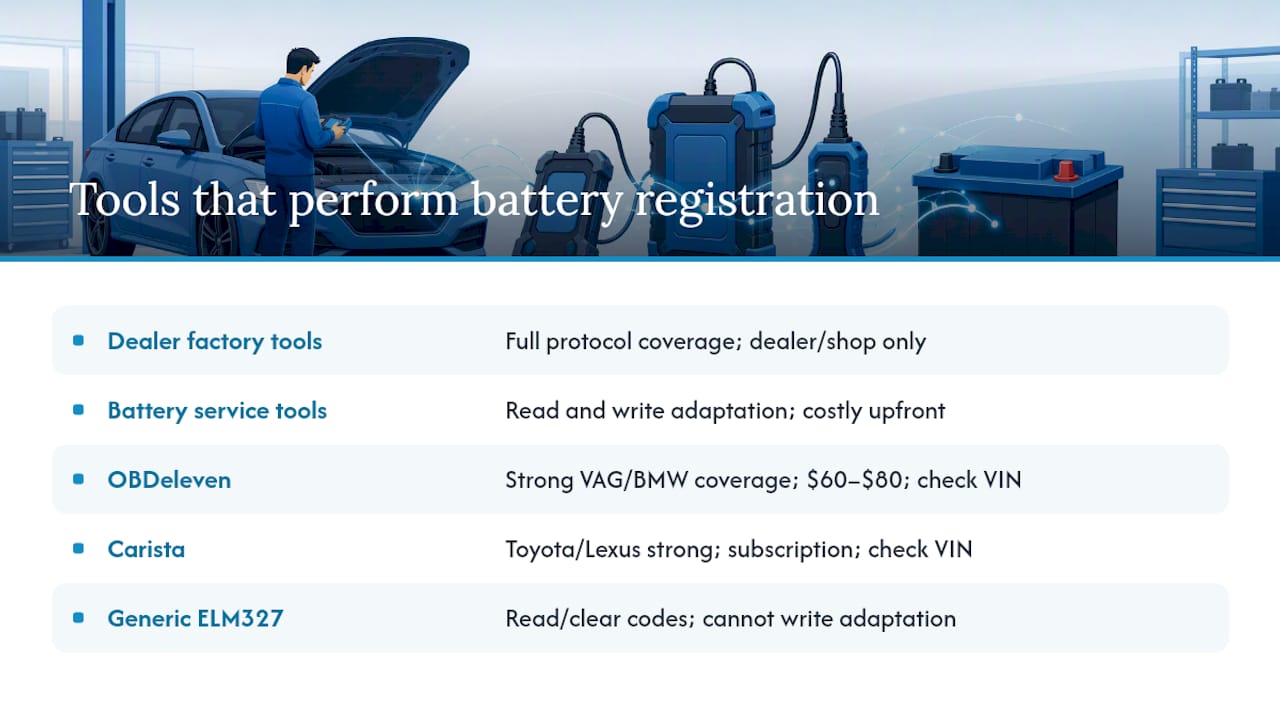
The tool category matters more than the brand name. Here is how the main options break down:
Dealer-level factory scan tools (BMW ISTA, VAG ODIS, Mercedes XENTRY): Full protocol coverage, no compatibility gaps, but not available to consumers. Your only access is through a dealer or a shop that invested in the license.
Dedicated battery service tools (Midtronics-style): These units read battery health and write adaptation values in one workflow. They handle protocol detection automatically, which removes a significant failure point for DIYers. Some auto parts chains offer loaner programs. The upfront cost for a personal unit runs several hundred dollars, which makes them practical for shops but hard to justify for a single repair.
OBDeleven: A Bluetooth OBD dongle paired with an Android or iOS app. Strong coverage for VAG (VW, Audi, Skoda, SEAT) and BMW. The OBDeleven support documentation lists exact menu paths for both KWP2000 and UDS platforms. The dongle costs around $60–$80; some advanced functions require credits or a subscription plan. Confirm your specific control unit is supported before buying.
Carista: Similar dongle-plus-app model, with a slightly different vehicle coverage list. Carista tends to have broader coverage for Toyota and Lexus in addition to European makes. The app requires a subscription for service functions. Check compatibility on Carista’s website using your VIN before committing.
Generic ELM327 dongles: These read and clear fault codes but generally cannot write adaptation values. They will not complete battery registration on most BMS-equipped vehicles. Do not rely on a $10 Bluetooth dongle for this task.
One practical note: smartphone OBD tools confirm compatibility at the app level, but the specific control unit variant in your car can still cause issues. Always verify against the tool’s compatibility database using your exact VIN, not just make and model.
Troubleshooting warning lights and errors after registration
Registration completed, but something still looks wrong? Work through these steps before assuming the worst.
Step-by-step diagnostic sequence:
- Clear any stored fault codes with your OBD tool after registration. Some codes set during the battery swap will not self-clear immediately.
- Start the engine and let it idle for 10–15 minutes. Check charging voltage at the battery terminals: 13.8–14.7V at idle is normal for most lead-acid variants; AGM should sit toward the lower end of that range.
- Read the adaptation values back through your scan tool to confirm the Ah, chemistry, and serial number were written correctly. A mismatched value here explains most post-registration problems.
- Drive a short cycle (15–20 minutes) with moderate electrical load. The BMS needs a drive cycle to fully calibrate to the new battery.
- Rescan for codes after the drive cycle.
Common symptoms and likely causes:
- Battery warning light stays on: Registration may not have saved correctly. Re-enter values and confirm the write succeeded.
- Start-stop unavailable message: Normal for the first few drive cycles after registration while the BMS recalibrates. If it persists beyond three or four cycles, re-check the adaptation values.
- Charging voltage above 15V: Possible BMS fault or incorrect chemistry coding. Stop driving and have the charging system inspected.
- Fast battery drain within days of installation: Either the battery arrived partially discharged, or the BMS is still applying an incorrect charging profile. Verify registration values and charge the battery fully with a standalone charger.
Red flags that mean stop driving and call a technician:
- Charging voltage consistently above 15V or below 12.8V at idle
- Burning smell from the battery area
- Battery case swelling or heat
- Multiple unrelated fault codes appearing simultaneously after registration
Safety steps and pre-install checks before you touch the battery
Physical safety comes before any software step. A mistake here can damage the vehicle’s electronics or cause injury.
Personal protection and handling:
- Wear nitrile or rubber gloves and safety glasses. Battery acid and hydrogen gas are real hazards.
- Work in a ventilated area. Charging batteries off-gas hydrogen, which is flammable.
- Keep metal tools away from the positive terminal. A wrench bridging positive to chassis ground will arc hard and can damage electronics instantly.
- Use proper lifting technique. A full-size automotive battery weighs 30–50 lbs.
Pre-install checklist:
- Confirm the replacement battery matches the OEM group size, terminal polarity, and Ah rating (or is an approved upgrade).
- Check the new battery’s charge level with a voltmeter. A reading below 12.4V means it needs a charge before installation.
- Inspect the battery tray for corrosion or damage. Clean with a baking soda and water solution if needed.
- Clean both terminals with a wire brush or terminal cleaner. Corrosion adds resistance and can cause false BMS readings after installation.
- Check whether an IBS sensor is clamped to the negative cable. If present, transfer it to the new battery’s negative terminal before reconnecting.
- Disconnect the negative cable first, then the positive. Reconnect in reverse order: positive first, then negative. This sequence is standard OEM practice and prevents accidental shorts.
Post-install verification before registration:
- Confirm both terminals are tight and the battery is secured in the tray.
- Turn the ignition to accessory and verify no immediate fault codes appear.
- Measure terminal voltage: should read 12.6V or higher for a fully charged battery.
- Then proceed to registration.
Key Takeaways
Battery registration after replacement is required on most BMS-equipped vehicles and takes about five minutes with the right OBD tool. Skipping it risks premature battery failure regardless of battery quality.
| Point | Details |
|---|---|
| Registration is required on BMS vehicles | Many BMW, VW/Audi, Mercedes, and some GM models with start-stop systems require registration after battery replacement. |
| Enter four key data fields | Ah capacity, battery technology (AGM/EFB/flooded), 3-character manufacturer code, and 10-digit serial number. |
| Three viable methods exist | Dealer scan tool, Midtronics-style battery service tool, or smartphone app (OBDeleven/Carista) with OBD-II dongle. |
| Chemistry coding matters as much as registration | Entering the wrong chemistry type causes incorrect charging voltage, which degrades even a brand-new battery. |
| Bansheebatteries sells AGM and LiFePO4 options | Confirm BMS compatibility before ordering; Bansheebatteries’ support team can help match the right battery to your vehicle. |
The part most DIYers get wrong
Most guides treat battery registration as a checkbox at the end of the job. The real mistake happens earlier: buying a battery without confirming chemistry compatibility with the vehicle’s BMS, then registering the wrong chemistry type because the label was ambiguous.
An AGM battery coded as “flooded” in the BMS will be overcharged. A flooded battery coded as “AGM” will be chronically undercharged. Neither failure shows up immediately. Both show up as a dead battery three to six months later, and neither is covered under a typical battery warranty because the charging system was technically functioning within its programmed parameters.
The second most common mistake is trusting a generic ELM327 dongle to complete the job. Those tools read codes. They do not write adaptation values. If you plug one in, navigate to a battery menu, and see no option to save values, that is why.
Registration is also not a one-time skill. The menu paths change between model years, and a procedure that worked on a 2019 Golf may not match a 2023 Golf exactly. Always pull up the current documentation for your specific model year before starting, not a forum post from four years ago.
The bottom line: the five minutes of registration work protects months of battery life. On a premium AGM or LiFePO4 unit, that investment pays for itself many times over.
Bansheebatteries has the battery and the guidance to match
Replacing a battery on a BMS-equipped vehicle is a two-part job: get the right battery, then register it correctly. Bansheebatteries makes the first part straightforward. Their AGM and LiFePO4 batteries are built for vehicles that demand reliable power under real conditions, backed by a 4-year warranty on AGM and a 5-year warranty on lithium marine units.
For powersports riders and marine owners considering a lithium upgrade, the Lithium Banshee Powersport Batteries collection covers a wide range of applications. Marine operators can browse the LiFePO4 marine battery lineup for deep-cycle and auxiliary applications. Not sure which chemistry works with your vehicle’s charging system? Bansheebatteries’ support team can walk you through compatibility before you order, so you are not guessing at registration time. Browse the full catalog at Bansheebatteries.com and pick up a compatible charger while you are there to keep the new battery in peak condition from day one.
Useful sources and further reading
The following sources were used to build this guide. Each one is worth bookmarking for model-specific procedures or tool documentation.
- Battery Registration: What, Why and How?
- How to change & register a car battery | OBDeleven
- How to Register a New Car Battery — Ricks Free Auto Repair Advice
- Keyword Protocol 2000
- Unified Diagnostic Services
- How to change your car battery (Wyotech guide)